How can I make a payment on my policy?
Policies with Obsidian, Trisura or Fortegra
If your policy is through one of our Steadily managed insurance products with carriers, Obsidian, Trisura, or Fortegra, follow these steps.
- Login to your client portal using your email address and one-time access code.
- Once logged in to your portal, a list of your policies with Steadily will display on the screen. Select the policy you want to pay for.
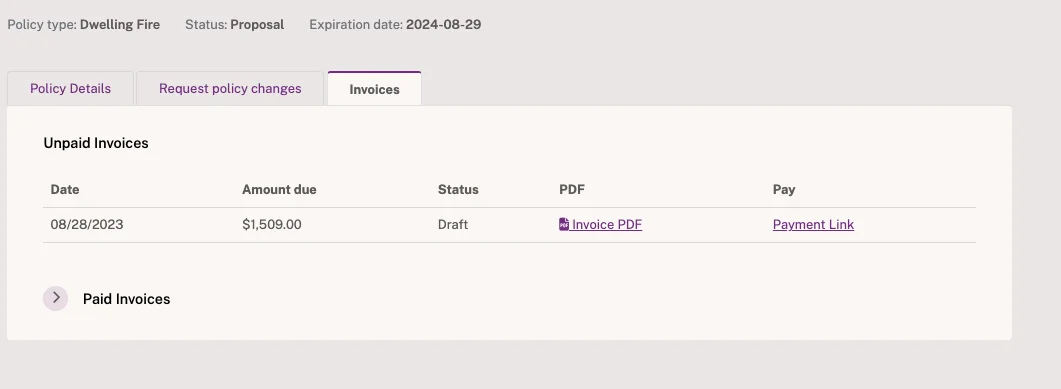
- The next screen will display the policy details. Select the tab labeled "Invoices".
- To pay, select "Payment Link". After payment is made, you will be able to download the receipt for your records.
Policies with other carriers
If your policy is through one of our many other appointed carriers, you have options! You can call us at 888.966.1611 to make a payment or select one of the links below to pay directly through the carrier online.
- Foremost - Foremost- Make an Online Payment
- AMIG - Amig- Make an Online Payment
- Travelers - Travelers- Make an Online Payment
- Safeco - Safeco
- Stillwater - Stillwater Self Service
- Guard - BHGUARD - Payment
- Wright Flood- Wright Flood- Make an Online Payment
- State Auto - Make a Payment | State Auto
- Liberty Mutual Liberty Mutual - eService
- PersonalUmbrella.com Go to PersonalInsured.com - Home - Select the "Bill Pay" tab and "Make a Payment". Enter your policy number and zip code and follow the prompts to complete.
Don't see your carrier? Give us a call at 888.966.1611 and we can assist you in making a payment over the phone.
Get coverage in minutes
Competitive rates nationwide. Purpose-built for rental property investors.
